Entities
Used to add single or multiple entities (extra entities) or to hide specific entities inside the status card. If you hide an entity using the 'Hide Entity' function, you will see some tabs where your entities are grouped, making it easier to find and hide them.
Info
To add an extra entity via YAML only you will also need to add it into the content. See the YAML example below.
- Extra Entities: - Choose the entities you want to add to status card from an entity picker
- Hide Entities: - Choose which entity you want to hide by entity, ara or label
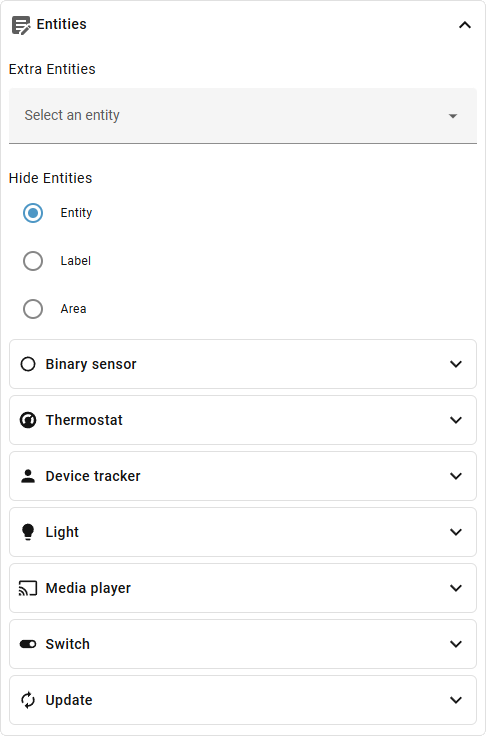
Editor Settings
Entity Settings
| Option | Description |
|---|---|
| Extra Entities | Add one or more extra entities |
| Hide Filter | Set the way you want to hide entities |
| Hidden Entities | Hide one or more entities |
| Hidden Labels | Hide one or more entities per label |
| Hidden Areas | Hide one or more entities per area |
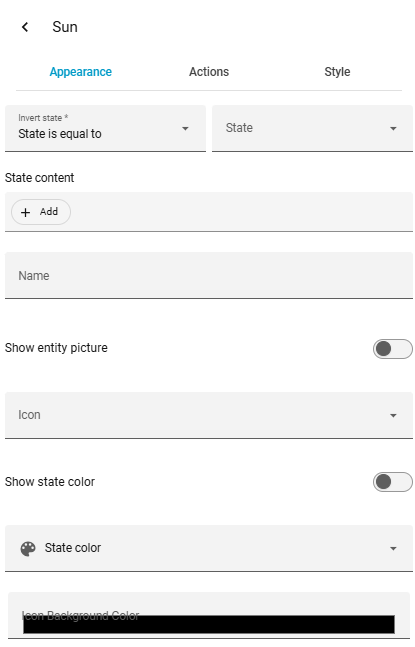
Editor Settings (per extra entity via customization)
| Option | Description |
|---|---|
| Name | Change display name |
| Icon | Change icon |
| Color | Change icon color |
| Invert State | Invert state |
| State | Force a specific state |
| State Content | Change state content |
| Show Entity Picture | Show entity picture |
| Activate State Color | Enable color based on state |
| Tap / Hold / Double Tap | Individual actions |
| Styles | Custom CSS |