Domain Items
Automatic entity grouping by domain (light, switch, fan, climate, etc.). HA default domain-specific icons for on and off states. Specific toggle or on/off actions.
Info
Make sure all wanted domains are listed in the content section. Otherwise the domain isnt shown in the card.
- Auto Grouping: Automatically grouped entities by domain
- Default toggle actions: actions that toggle or switch on/off
- Icons: Domain-specific (e.g. mdi:lightbulb / mdi:lightbulb-outline)
Allowed Domains with their default toggle actions:
| Domain | Toggle Action (On → Off) | Toggle Action (Off → On) |
|---|---|---|
| Alarm_control_panel | alarm_arm_away |
alarm_disarm |
| Siren | toggle |
toggle |
| Lock | lock |
unlock |
| Light | toggle |
toggle |
| Media_player | media_pause |
media_play |
| Climate | toggle |
toggle |
| Switch | toggle |
toggle |
| Vacuum | stop |
start |
| Fan | toggle |
toggle |
| Cover | toggle |
toggle |
| Binary Sensor | — | — |
| Humidifier | toggle |
toggle |
| Lawn Mower | pause |
start_mowing |
| Valve | toggle |
toggle |
| Water Heater | turn_off |
turn_on |
| Remote | toggle |
toggle |
| Update | skip |
install |
| Device Tracker | — | — |
| Input Boolean | — | — |
| Timer | — | — |
| Counter | — | — |
| Calendar | — | — |
Editor Settings (per Domain customization)
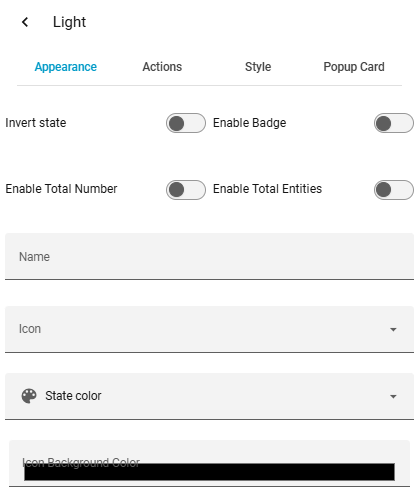
| Option | Description |
|---|---|
| Name | Change display name of the domain |
| Icon | Change icon of the domain |
| Color | Change icon color |
| Icon Background Color | Icon background color (RGBA with transparency) |
| Invert State | Show "off" instead of "on" (e.g. for locks: open instead of closed) |
| Enable Total Entities | Show all entities instead of "on" entities only |
| Enable Total Number | Show total count (e.g. 1/7 lights on) |
| Badge Mode | Compact display: icon + badge count only |
| Badge Color | Set individual badge color |
| Tap Action | Action on tap (toggle, more-info, navigate, url, perform-action, none) |
| Hold Action | Action on hold |
| Double Tap Action | Action on double tap |
| Styles | Custom CSS |
| Popup Card | Change card type shown in popup for specific domain |